Forum Discussion

Count matching cells diagonally

Hayles739 , you are welcome.
You may handle errors like
=IFERROR(AGGREGATE(15,6,1/($A$1:$G$1<>$A$1)*COLUMN($A$1:$G$1),1)-1, <do something else if an error in main formula>)As for finding B cell and counting them I didn't catch what exactly do you mean. Initial requirement was to count how many times is repeated first cell in the sequence.
For better understanding it will be better if you submit sample file with entered manually desired result.

Sorry I had to go out, I've added an example of what I'm looking for with the answers I hope you can find a formula for. Hope that helps to clarify what I''m trying to do? and thankyou so much for all the help so far
- SergeiBaklanDec 23, 2019Diamond Contributor
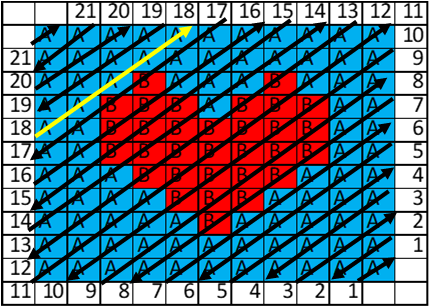
I didn't catch how it works exactly. Let take 17 - I guess we shall check cells B7,C6,D5,E4,F3,G2. It gives 2A2B2A, not 5A as in the sample.
- Hayles739Dec 23, 2019Copper Contributor
SergeiBaklan Ive added a picture to show the direction of the formulas (if that makes sense) and have made the line for number 17 yellow.
I was thinking before i asked on here that I could use if functions for each cell but at its largest I would need to add 70+ if functions for one cell so was looking for an easier way. The actual spreadsheet I want to analyse is 77x96 cells with each cell changing as I need to. Currently I print out the 77x96 cells and count them by hand.
- SergeiBaklanDec 23, 2019Diamond Contributor
I believe that could be done easier even without VBA, but so fa r didn't find the solution. For your sample
for the helper columns in Q1
=TEXTJOIN("",TRUE,
IF( ISODD($P1),
INDEX($B$2:$L$12,
   LARGE(COLUMN(INDEX($A$1:$K$1,MAX(1,12-$P1)):INDEX($A$1:$K$1,MIN(11,22-$P1))  ),COLUMN($A$1:INDEX($A$1:$K$1, IF($P1<=11,$P1,22-$P1)   ))),
   COLUMN(INDEX($A$1:$K$1,MAX(1,12-$P1)):INDEX($A$1:$K$1,MIN(11,22-$P1)))
),
INDEX($B$2:$L$12,
   COLUMN(INDEX($A$1:$K$1,MAX(1,12-$P1)):INDEX($A$1:$K$1,MIN(11,22-$P1))),
   LARGE(COLUMN(INDEX($A$1:$K$1,MAX(1,12-$P1)):INDEX($A$1:$K$1,MIN(11,22-$P1))),COLUMN($A$1:INDEX($A$1:$K$1,IF($P1<=11,$P1,22-$P1))))
)
))
in R1
=TEXTJOIN("",1,
   IF(
      SUBSTITUTE(
         FREQUENCY(
            IF(MID(Q1,COLUMN($A:$U),1)="A",COLUMN($A:$U)),
            IF(MID(Q1,COLUMN($A:$U),1)="A",0, COLUMN($A:$U))
         ),
         0,""
      ) = "",
      "",
      SUBSTITUTE(
         FREQUENCY(
            IF(MID(Q1,COLUMN($A:$U),1)="A",COLUMN($A:$U)),
            IF(MID(Q1,COLUMN($A:$U),1)="A",0, COLUMN($A:$U))
         ),
         0,""
      ) & "A"
   ) &
   IF(
      SUBSTITUTE(
         FREQUENCY(
            IF(MID(Q1,COLUMN($A:$U),1)="B",COLUMN($A:$U)),
            IF(MID(Q1,COLUMN($A:$U),1)="B",0, COLUMN($A:$U))
         ),
         0,""
      ) = "",
      "",
      SUBSTITUTE(
         FREQUENCY(
            IF(MID(Q1,COLUMN($A:$U),1)="B",COLUMN($A:$U)),
            IF(MID(Q1,COLUMN($A:$U),1)="B",0,COLUMN($A:$U))
         ),0,""
      ) & "B"
   )
)
, in S1, T1 and U1
=LEFT(R1,2)
=MID(R1,3,2)
=MID(R1,5,2)
and drag all of them down.