Forum Discussion

Bielalve
Aug 09, 2022Copper Contributor
Count different texts
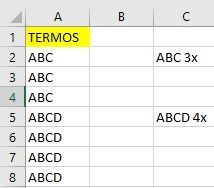
Basically I'm working only with column A, where I have several different terms, but they repeat in different amounts. I need to know how many times each of these terms appeared in column A, is there ...
 Aug 09, 2022
Hi Bielalve
Recentily Microsoft upgrade to Excel's formula language to support https://support.microsoft.com/en-us/office/dynamic-array-formulas-and-spilled-array-behavior-205c6b06-03ba-4151-89a1-87a7eb36e531.
Now you cold use this simple way to do this
=UNIQUE(A2:A1812) & " " &COUNTIF(A2:A1812;UNIQUE(A2:A1812)) & "x"or if you need filter nulable results try this other form
=LET(
           rangecells;A2:A1812;
           uniqList; UNIQUE(rangecells);
           filteredList; FILTER(uniqList;uniqList<>"");
           return; filteredList & " " &COUNTIF(rangecells;filteredList)  & "x";
 return
)
Hope it help you

Harun24HR
Aug 09, 2022Silver Contributor
Bielalve Use CHOOSE() with UNIQUE() and COUNTIF() for one go. All below solution are included to attach sample file.
=CHOOSE({1,2},UNIQUE(A2:A8),COUNTIF(A2:A8,UNIQUE(A2:A8))& "x")To show result in same cell use-
=UNIQUE(A2:A8)&" "&COUNTIF(A2:A8,UNIQUE(A2:A8))&"x"For LAMBDA() approach to use custom function via Name Manager, try-
=LAMBDA(inRng,CHOOSE({1,2},UNIQUE(inRng),COUNTIF(inRng,UNIQUE(inRng))& "x"))(A2:A8)
Icassatti
Aug 10, 2022Brass Contributor
Man i learned more with your solution. I never use choose function to combine many arrays, like you did. Thank you for put your contribution.