Forum Discussion

copy values from one excel sheet to another by matching multiple columns
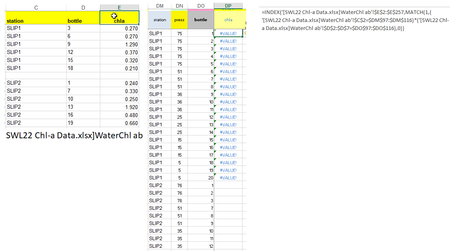
 Aug 10, 2022
= INDEX('[SWL22 Chl-a Data.xlsx]WaterChl ab'! $E$2:$E$257 ,MATCH(1,('[SWL22 Chl-a Data.xlsx]WaterChl ab'! $C$2:$C$257=DM2)*('[SWL22 Chl-a Data.xlsx]WaterChl ab'! $D$2:$D$257=DO2),0))
I assume the data in the other file starts in row 2 in cells DM2 (SLIP1), DN2 (75), DO2 (1) and the formula should be in cell DP2. From cell DP2 the formula can be filled down.
The formula has to be entered with ctrl+shift+enter if you don't work with Office365 or 2021.
=INDEX($E$2:$E$257,MATCH(1,($C$2:$C$257=DM2)*($D$2:$D$257=DO2),0))I've tried this corresponding formula within one spreadsheet and it works as expected.
If there isn't a match the formula returns #NA (#NV in german Excel). If there shouldn't be an error message the whole formula can be wrapped inside IFERROR.
=IFERROR(INDEX($E$2:$E$257,MATCH(1,($C$2:$C$257=DM2)*($D$2:$D$257=DO2),0)),"")


As a comment, to avoid Ctrl+Shift+Enter on previous versions you may modify OliverScheurich formula like
=IFNA( INDEX($E$2:$E$257,MATCH(1,INDEX( ($C$2:$C$257=DM2)*($D$2:$D$257=DO2), 0 ),0)), "no such" )- ReneeBay5000Aug 11, 2022Copper ContributorAwesome! Yes that worked! Thanks!