Forum Discussion

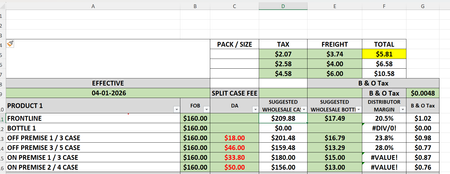
Copy a formual, locking 1 data cell
 Jul 15, 2026
You can fix your formula by using an absolute reference for F5:
Code
=(D11-(B11+$F$5)-(G11)+C11)/D11
Some explanation on references below :
Relative reference (F5)
Moves when you copy the formula.
Example: F5 → F6 → F7
Absolute reference ($F$5)
Stays fixed no matter where you copy the formula.
Use this when one value must remain constant.
Mixed reference ($F5 or F$5)
Locks only the column or only the row.
Useful when copying across rows or columns.
In your case, $F$5 keeps the value fixed while the rest of the formula updates correctly as you copy it down.
You can fix your formula by using an absolute reference for F5:
Code
=(D11-(B11+$F$5)-(G11)+C11)/D11
Some explanation on references below :
Relative reference (F5)
Moves when you copy the formula.
Example: F5 → F6 → F7
Absolute reference ($F$5)
Stays fixed no matter where you copy the formula.
Use this when one value must remain constant.
Mixed reference ($F5 or F$5)
Locks only the column or only the row.
Useful when copying across rows or columns.
In your case, $F$5 keeps the value fixed while the rest of the formula updates correctly as you copy it down.