Forum Discussion

nasirabd
Dec 13, 2021Copper Contributor
Convert Date/Time String to Date Format
I am seeking assistance with converting a string that is a date/time value into a date format in Excel. I would like to use this field along with associated data in a pivot table to group by day, we...
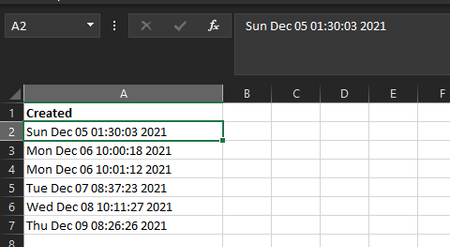
- Dec 13, 2021
You may convert text to date by formula like
=DATE(
  RIGHT(A2,4),
  MONTH( 1&LEFT( RIGHT(A2,  LEN(A2) -4), 3) ),
  LEFT( RIGHT(A2,  LEN(A2) -8), 2))
and apply to result any date format you wish.

SergeiBaklan
Jan 19, 2022Diamond Contributor
There is another way which could work
- Enter this date in any empty cell in your regional format
- Copy this cell
- Select all dates in one of the column
- Paste -> Paste Special -> Multiply -> Ok
- Now we have dates (aligned to the right), not texts

jlambie61
Jan 19, 2022Copper Contributor
Thank you again.. I had forgotten that was how we solved this 6 mos. ago. It's a recurring issue. I prefer the formula of Cell+0