Forum Discussion

nasirabd
Dec 13, 2021Copper Contributor
Convert Date/Time String to Date Format
I am seeking assistance with converting a string that is a date/time value into a date format in Excel. I would like to use this field along with associated data in a pivot table to group by day, we...
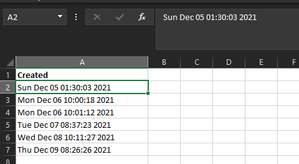
- Dec 13, 2021
You may convert text to date by formula like
=DATE(
  RIGHT(A2,4),
  MONTH( 1&LEFT( RIGHT(A2,  LEN(A2) -4), 3) ),
  LEFT( RIGHT(A2,  LEN(A2) -8), 2))
and apply to result any date format you wish.

jlambie61
Jan 19, 2022Copper Contributor
Apologies for the resend. I don't know the user interface here that let me get to your answer. The simpler version works. I'm curious to try the string formula.
Thank you very much. Awkwardly dumb issue but with a lot of data, vital to have an easy way to convert.
Thank you very much. Awkwardly dumb issue but with a lot of data, vital to have an easy way to convert.

SergeiBaklan
Jan 19, 2022Diamond Contributor
There is another way which could work
- Enter this date in any empty cell in your regional format
- Copy this cell
- Select all dates in one of the column
- Paste -> Paste Special -> Multiply -> Ok
- Now we have dates (aligned to the right), not texts
- jlambie61Jan 19, 2022Copper ContributorThank you again.. I had forgotten that was how we solved this 6 mos. ago. It's a recurring issue. I prefer the formula of Cell+0