Forum Discussion

scottmcarroll
Aug 19, 2024Copper Contributor
Consolidating Information with Duplicates in Some Cells
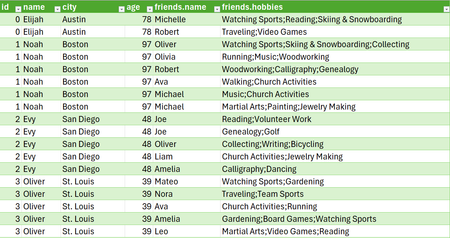
In the process of flattening a JSON file I wound up with a table that had duplicates in some cells but not others. See Below: PowerQuery created a duplicate for ID, Name, City, and Age for eve...

SergeiBaklan
Aug 19, 2024Diamond Contributor
You may Group By on id, city, and age selecting any aggregation from user interface (e.g. SUM) and after that change in formula bar List.Sum([friends.name]) on Text.Combine( [friends.name], ", ").
 scottmcarrollAug 19, 2024Copper Contributor
Thank you very much! That is very helpful.
I realized after posting this that each friend also had unique hobbies.
My thought was to first combine both the friends and their hobbies in a new column, maybe using parentheses - then to use the Group By command with the combination.
Ex) Sergei (Snowboarding, Giving great answers)
Any thoughts about how to manage the hobbies as well?
Thank you Sergei!- SergeiBaklanAug 19, 2024Diamond Contributor
Perhaps it's better to use another characters to make so long texts more readable, like
with
let Source = Excel.CurrentWorkbook(){[Name="Source"]}[Content], face = Character.FromNumber(128512), MergeNameHobbies = Table.CombineColumns( Source, {"friends.name", "friends.hobbies"}, Combiner.CombineTextByDelimiter(" (", QuoteStyle.None), "friend.names (hobbies)" ), AddSuffix = Table.TransformColumns( MergeNameHobbies, { {"friend.names (hobbies)", each _ & ")", type text} }), AddPrefix = Table.TransformColumns( AddSuffix, { {"friend.names (hobbies)", each face & _, type text} }), #"Grouped Rows" = Table.Group(AddPrefix, {"id", "name", "city", "age"}, { {"friend.names (hobbies)", each Text.Combine([#"friend.names (hobbies)"], " "), type text}}) in #"Grouped Rows" - SergeiBaklanAug 19, 2024Diamond Contributor
As variant that could be
let
    Source = Excel.CurrentWorkbook(){[Name="Source"]}[Content],
    #"Merged Columns" = Table.CombineColumns(Source,{"friends.name", "friends.hobbies"},Combiner.CombineTextByDelimiter(" (", QuoteStyle.None),"friend.names (hobbies)"),
    #"Added Suffix" = Table.TransformColumns(#"Merged Columns", {{"friend.names (hobbies)", each _ & ")", type text}}),
    #"Grouped Rows" = Table.Group(#"Added Suffix", {"id", "name", "city", "age"}, {{"friend.names (hobbies)", each  Text.Combine([#"friend.names (hobbies)"], "; "), type text}})
in
    #"Grouped Rows"
Please check in attached.