Forum Discussion

keao46
Mar 07, 2023Copper Contributor
Consolidate multiple tables of data into one table
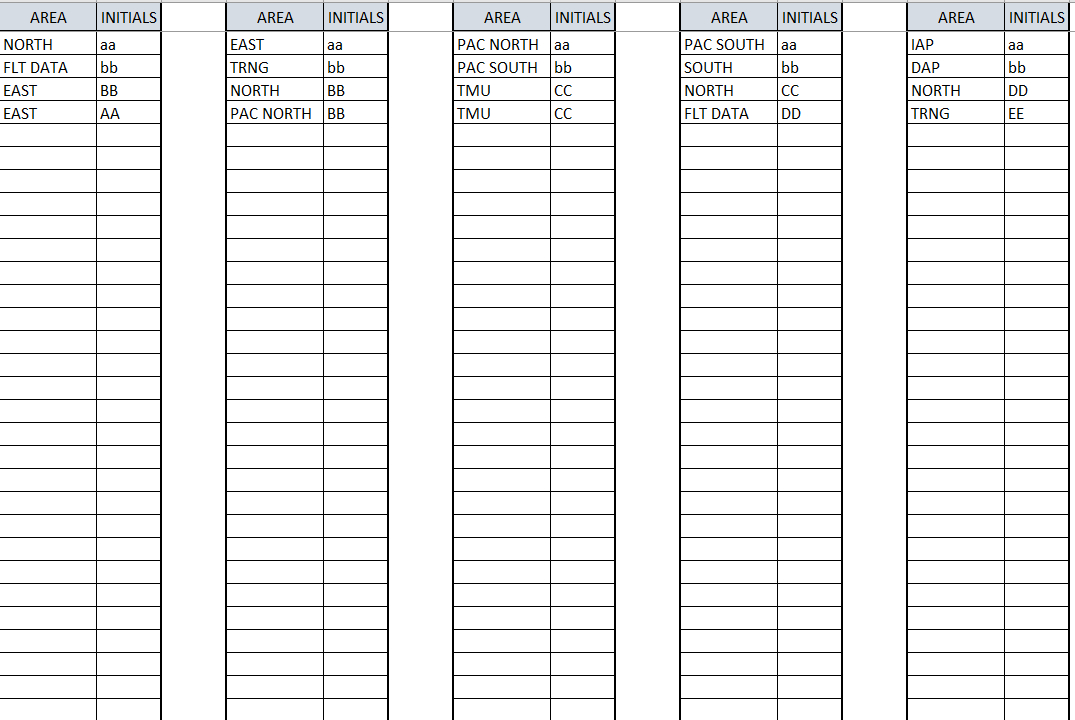
Hello, I have been trying to work on a formula to combine the 5 tables of data into one table and sort into categories for over a week. I am truly stuck. Could someone please assist me in this ...

 Mar 07, 2023
I'll step you through my solution.
1. Stack the tables with VSTACK- called 'tStack'
=VSTACK(Table1, Table2, Table3, Table4, Table5)2. Pull the 'Initials' from the tStack
=TAKE(tStack, , -1)3. Pull the 'Area' from tStack
=TAKE(tStack, , 1)4. Define a constant called 'order' to help with the ordering of columns in the end result:
={"NORTH"; "SOUTH"; "EAST"; "PAC NORTH"; "PAC SOUTH"; "TMU"; "FLT DATA"; "IAP"; "DAP"; "TRNG"}5. 'Organize' Lambda checks a unique listing of areas in the order you prefer left to right. It locates potentially multiple initials per area, stacks it vertically, and then stacks results horizontally.
Organize Lambda
=LAMBDA(a,v,LET(filtered, FILTER(Initials, Area = v), IFERROR(HSTACK(a, VSTACK(v, filtered)), "")))
6. REDUCE delivers the solution.
=DROP(REDUCE("",Order,Organize),,1)
Patrick2788
Mar 07, 2023Silver Contributor
Glad I could help. You may want to start a new discussion for the userform. I use VBA as a last resort and don't keep up with it as much as some on this board.

keao46
Mar 08, 2023Copper Contributor
- Patrick2788Mar 08, 2023Silver Contributor