Forum Discussion

Lucdejong
Jan 11, 2021Copper Contributor
Connecting match to a dropdown list
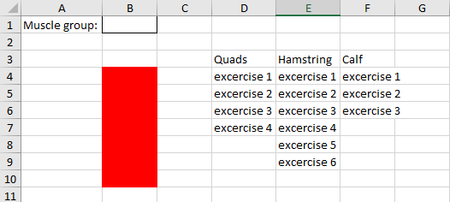
Hi, I have a question This is my work sheet. What I would like is this: when Quads is selected in the dropdownlist (cel B2), i want all the excercise below the name Quads (D3) placed in the ...
- Jan 12, 2021
It will be better if you indicate on which version of Excel you are - are you with dynamic arrays, LET() function?
Couple of more variants
=INDEX($D$4:$F$36,SEQUENCE(COUNTA(INDEX($D$4:$F$36,0,MATCH($B$1,$D$3:$F$3,0)))),MATCH($B$1,$D$3:$F$3,0))
or
=INDEX($D$4:$F$36,ROW(INDIRECT("A1:A"&COUNTA(INDEX($D$4:$F$36,0,MATCH($B$1,$D$3:$F$3,0))))),MATCH($B$1,$D$3:$F$3,0))

Lucdejong
Jan 12, 2021Copper Contributor
SergeiBaklan Riny_van_Eekelen, Thank you both for your fast response. I really like your ideas, but there is one problem. If I add more exercises the cells in the red collum won't add them automatically. Is there a way I can add excercises in for example quads and that is will show in the red cells?

SergeiBaklan
Jan 12, 2021Diamond Contributor
It will be better if you indicate on which version of Excel you are - are you with dynamic arrays, LET() function?
Couple of more variants
=INDEX($D$4:$F$36,SEQUENCE(COUNTA(INDEX($D$4:$F$36,0,MATCH($B$1,$D$3:$F$3,0)))),MATCH($B$1,$D$3:$F$3,0))
or
=INDEX($D$4:$F$36,ROW(INDIRECT("A1:A"&COUNTA(INDEX($D$4:$F$36,0,MATCH($B$1,$D$3:$F$3,0))))),MATCH($B$1,$D$3:$F$3,0))