Forum Discussion

Lucdejong
Jan 11, 2021Copper Contributor
Connecting match to a dropdown list
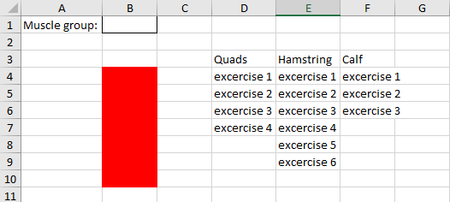
Hi, I have a question This is my work sheet. What I would like is this: when Quads is selected in the dropdownlist (cel B2), i want all the excercise below the name Quads (D3) placed in the ...
- Jan 12, 2021
It will be better if you indicate on which version of Excel you are - are you with dynamic arrays, LET() function?
Couple of more variants
=INDEX($D$4:$F$36,SEQUENCE(COUNTA(INDEX($D$4:$F$36,0,MATCH($B$1,$D$3:$F$3,0)))),MATCH($B$1,$D$3:$F$3,0))
or
=INDEX($D$4:$F$36,ROW(INDIRECT("A1:A"&COUNTA(INDEX($D$4:$F$36,0,MATCH($B$1,$D$3:$F$3,0))))),MATCH($B$1,$D$3:$F$3,0))


Lucdejong
Jan 12, 2021Copper Contributor
SergeiBaklan Riny_van_Eekelen, Thank you both for your fast response. I really like your ideas, but there is one problem. If I add more exercises the cells in the red collum won't add them automatically. Is there a way I can add excercises in for example quads and that is will show in the red cells?