Forum Discussion

Kristine2021
Jul 15, 2025Brass Contributor
Conditionally Fill a Cell Based on Row/Cell Count
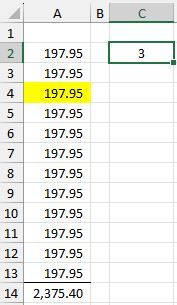
I am trying to conditionally fill/highlight a cell in column A, based on the number of rows to count to get to it... For example: Adding to a cell just adds to...

HansVogelaar
Jul 15, 2025MVP
Select A2:A13 (or as far down as needed). A2 should be the active cell in the selection.
On the Home tab of the ribbon, click Conditional Formatting > New Rule...
Select 'Use a formula to determine which cells to format'.
Enter the formula
=ROW(A2)=$C$2-1
Click Format...
Activate the Fill tab.
Select yellow as fill color.
Click OK, then click OK again.
- Kristine2021Jul 15, 2025Brass Contributor
Thank you, Hans... someone gave me this:
=ROW()=$C$2+ROW($C$2)-1
And that seemed to work... looks very similar to what you had.
Many thank you's for you assistance!
