Forum Discussion

Faust25
May 10, 2022Copper Contributor
Conditional Formatting
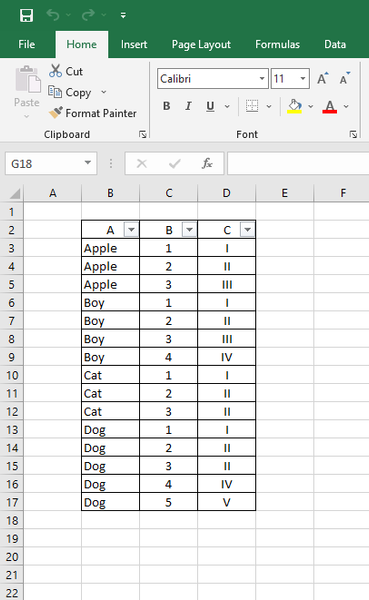
In this table I want to highlight / change the colors of the rows (from Column ("A,B,C")when from Column "A" changes its values - example from column "A" all the rows that has "Apple" in them w...

Sekoleyte
May 11, 2022Iron Contributor
Hi there.
If you have office 365, UNIQUE function can be useful instead of adding extra columns. I don't like to use extra columns to do something. i always prefer base data to do it.
It works as you said but no need to put an extra column.
=ISODD(COUNTA(UNIQUE($B$3:$B3)))
I share the file with you as well.