Forum Discussion

Conditional Formatting
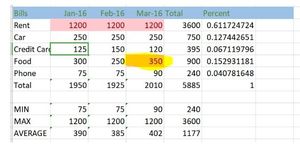
- Mar 05, 2021Here is a small example, also with conditional formatting.Example in the inserted file.If you go into the blank cells, you will see values in them.You can change any value to any number.If any number is greater than 300, the cell will turn yellow when the number below 300 in the cell disappears.If you liked our help, please give us (everyone involved) a thumbs up and by clicking on correct answer for the solution proposal without conditional formatting (is also the most suitable).This way, other members will also be able to benefit from it.Thank you,Nikolino

Here are some examples in the inserted template file for your project.
The easiest solution:
With the left mouse button pressed, select the area from which this formatting should be.
Go to Conditional Formatting
Select "New Rule"
Click "Format only cells that contain ..."
Format cells only with:
Cell value - less than - 300
Click on the "Format ..." button
Opens a new window "Shape cells"
font
Color white
Press OK until the end
After that, the values below 300 can no longer be seen in all cells, but they can still be totaled.
I would be happy to know if I could help.
Nikolino
I know I don't know anything (Socrates)
* Kindly Mark and Vote this reply if it helps please, as it will be beneficial to more Community members reading here.
 ExcelMar 05, 2021Iron ContributorThank you so much sir for reply.
Is there ant alternative way to in large data I want to see only data which is above 300. how to see that data only.- NikolinoDEMar 05, 2021Platinum ContributorI believe the approach suggested by Mr Baklan is best for you. You don't even need conditional formatting.
Thank you for your understanding and patience,
Nikolino- ExcelMar 05, 2021Iron ContributorYes sir😊
Your method is also great for easily see to which criteria is less or high.
Thank you so much sir hor helipng me😊😊
- SergeiBaklanMar 05, 2021Diamond Contributor
You may apply custom number format
In the first row numbers are without formatting, in the second one with format applied as above.
- ExcelMar 05, 2021Iron ContributorThank you so much sir for helping me😊😊
