Forum Discussion

Conditional Formatting values across tables
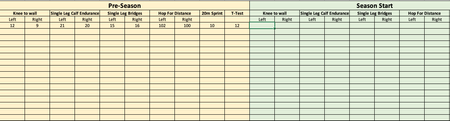
- Nov 25, 2018
I'd suggest the rule with formula
=(E3<A3)*NOT(ISBLANK(E3))
applied to entire range. With that you don't format blank cells and do not generate a bunch of rules (one rule for each cell) as with Format painter.


Hi,
you can do it column by column but you will still need to do the first cell manually
- use conditional formatting for the first cell then use Format Painter and extend to the end of the column.
unfortunately: the empty cells will considered have the value ( 0) so they will be painted in RED till you fill them with correct numbers
- SergeiBaklanNov 25, 2018Diamond Contributor
I'd suggest the rule with formula
=(E3<A3)*NOT(ISBLANK(E3))
applied to entire range. With that you don't format blank cells and do not generate a bunch of rules (one rule for each cell) as with Format painter.
- ChrisJPNov 25, 2018Copper ContributorHi,
what would the 2 formulas be, if the value was < A3 but only within 10% to equal yellow
and if it was greater then <10% = red- SergeiBaklanNov 26, 2018Diamond Contributor
Hi,
When yellow
=(E3<A3)*(E3>=0.9*A3)
and red
=(E3<0.9*A3)*NOT(ISBLANK(E3))
if I understood you correctly
- ChrisJPNov 25, 2018Copper Contributor
Works Perfectly,
THANKYOU!