Forum Discussion

Jenbons
Jun 20, 2022Copper Contributor
Conditional formatting to highlight a cell where 2 dates match
I'm trying to create a spreadsheet with a Gantt chart layout, and want to use conditional formatting to place a colour cell where a particular activity starts. I have the dates running across the to...

OliverScheurich
Jun 20, 2022Gold Contributor
=SUMPRODUCT(($A3=Tabelle2!$C$9:$C$15)*(C$2=Tabelle2!$D$9:$D$15))Maybe with this rule for conditional formatting.
 JenbonsJun 20, 2022Copper Contributor
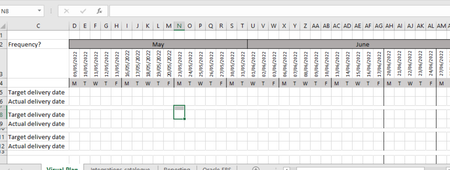
OliverScheurich Thank you - but I can't get that to work. I've simplified things by pulling the dates into the same sheet as below - is there a simpler formula which asks if 2 dates match between row 3 and column D, shade that cell in relation to the date of row 3?
- OliverScheurichJun 20, 2022Gold Contributor
=$D5=G$3You can try this rule for conditional formatting.
=$G$5:$AN$11Above is the "Applies to" range from the attached example.
- JenbonsJun 21, 2022Copper ContributorThanks so much - that's far simpler than I thought, but is working perfectly. Much appreciated!