Forum Discussion

shawnc1959
Dec 14, 2021Copper Contributor
Conditional formatting to change row color when cell value changes
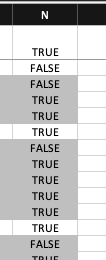
I'm trying to use conditional formatting to shade "groups" of rows when the value in column A changes (so all rows with the same value are either shaded or not). To distinguish when the key value ch...
- Dec 14, 2021
It looks like the rule is one row off.
Delete the rule and start over.
Make sure that the active cell in the selection is in the first row of the selection.
Also make sure that the formula in the rule refers to the cell in that row in column N.

HansVogelaar
Dec 14, 2021MVP
It looks like the rule is one row off.
Delete the rule and start over.
Make sure that the active cell in the selection is in the first row of the selection.
Also make sure that the formula in the rule refers to the cell in that row in column N.
 shawnc1959Dec 14, 2021Copper Contributor
HansVogelaar It looks like the selection was off ... I was trying to apply it to all the rows in the target columns (i.e., $A:$N), but redoing it with the specific cells seemed to fix it.
Thanks!