Forum Discussion

Conditional Formatting Rules randomly being deleted, not by a person, on shared workbook
 Jan 15, 2025
Wanted to follow back up for anyone's interest or to benefit others. I believe I found a workaround/band-aid solution. See below "TLDR" to jump to this.
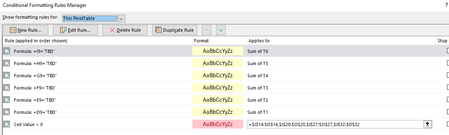
I haven't confirmed this with our IT department, but as far as I know everyone in our company is on the same 365 version and I would think we're all on the same desktop app version as that is all controlled by their policies. We do have a few users on Macs. But some of the above suggestions did get me thinking it had something to do with people editing the spreadsheet in the online/browser version vs the Desktop App, which is what I typically prefer to use. I tried to switch myself to the online/browser version and realized then that I couldn't even create a conditional formatting rule that used a formula for the condition or gives the option on the "Applies to" for Pivot Table options (see screenshot). So, I started to guess when a user refreshed all pivot tables in the sheet from the online/browser version, Excel would remove the rules that used either of these features.
TLDR: Workaround/"Solution" - I created a Welcome tab/page in the spreadsheet (see screenshot) and instructed users to open the sheet in the Desktop app. In the Browser View Options (File>Info), I deselected all of the other sheets except for this one. For the past couple of days, the formatting seems to be sticking and I haven't had any reports that anyone has been unable to edit/access the sheet. Fingers crossed this works, but certainly isn't an idea long term solution and would really be ideal if Microsoft could fix this.

I tend to avoid pivot tables where a formulae will do, so claim no particular expertise. From what I remember though, is that pivot tables grow and shrink and generally change shape as the source data changes or the view of the data is changed. This leads to a situation in which cells that were formerly used by the pivot table are released. My experience was that the released cells were formatted to the default 'normal' style rather than retaining the formatting rules that applied before the cells became part of the pivot table.