Forum Discussion

Conditional Formatting Rules for Icon Sets
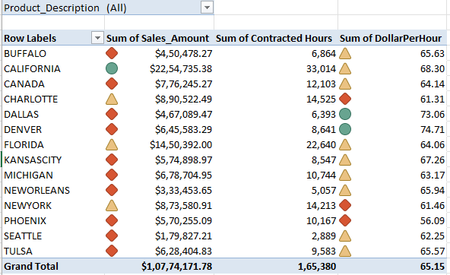

It takes the max value in your data and uses that as 100%. The minimum value is 0%. The percentages are calculated as (CurVal-MaxVal)/(MaxVal-MinVal) and those numbers are used to choose the icons.

Hi, JKPieterse
applied your formula to calculate Pct_CalcOfSalesAmt. Pls see Column E :
The formula bar screen shot for reference:
However, we are subtracting the Maximum Value from the current value, and hence, all the values are appearing in Negative figure. The Maximum Value INR 2254735 is calculated 0% ( Cell E5) and Minimum Value comes to 100%.
If we remove the Minus sign by using ABS() Function that returns an absolute value, the resulting values of the formula do not qualify the formatting rule. For example, CANADA, DALLAS, DENVER sales amount should get "Green" icon as the Sales Pct in Col E exceeds 67%.
Will wait for your reply.
Regards