Forum Discussion

conditional formatting formula help please
- Mar 29, 2018
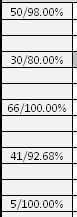
you need to setup your conditional formatting using this formula in the criteria
so simply select the column lets say column A and then go to conditional formatting and put this below formula.
=((RIGHT(A1,LEN(A1)-FIND("/",A1,1)))+0)>0.96
please download and open the attached example which I uploaded here.

you need to setup your conditional formatting using this formula in the criteria
so simply select the column lets say column A and then go to conditional formatting and put this below formula.
=((RIGHT(A1,LEN(A1)-FIND("/",A1,1)))+0)>0.96
please download and open the attached example which I uploaded here.

Jamil Mohammad, thank you so much!
This is exactly what I was trying to create, but for some reason my formula was falling apart. This is working perfectly now. I'm so grateful
- JamilMar 30, 2018Bronze ContributorYou are welcome James.
Thanks for the feedback. Seema DastagirAug 14, 2018Copper Contributor
Hi
Could someone help me with conditional formatting formulas.
I have list of tasks in Col B and Tasks status in Col D - I would want to strikeout the Tasks in Col A if Col D task status is marked as "Completed"
Could someone help please
Regards
Seema
- JamilAug 30, 2018Bronze Contributor
Salaam Seema,
please see attached workbook with example.
if Column D is "Completed" Column A gets strikeout.