Forum Discussion

MCalhoun111
Feb 21, 2022Copper Contributor
Conditional formatting for rows with and without text
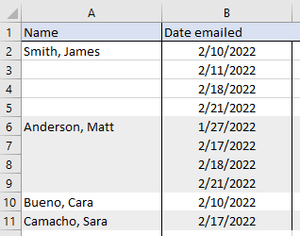
Is there a way to format the fill color of rows based on the information in Column A? for example: I have a list of people in column A (lets say A1, A2, and A6) and dates I emailed them in column...

OliverScheurich
Feb 21, 2022Gold Contributor
=AND($A2="",$B2="")Is this the rule for conditional formatting you are looking for?
In the attached example conditional formatting is applied to range:
=$A$2:$B$24
The gray cells change to white color as soon as data is entered.
 MCalhoun111Feb 21, 2022Copper ContributorHmmm... in the PDF you attached, it shows only the blank cells filled, not them switching back and forth.
In my spreadsheet, I have data through column K. I would like the colors to switch from gray to white (or white to gray) whenever new data is entered into column A and have it apply to the entire row. Does that make sense?- OliverScheurichFeb 21, 2022Gold Contributor
Unfortunately i am not sure what is meant by switching back and forth. Maybe you want conditional formatting as in the attached file? If data is entered in A2 the row from column A to K is formatted white and gray in alternating order with this rule:
=$A2<>""Formatting is applied to range:
=$A$2:$A$25;$C$2:$C$25;$E$2:$E$25;$G$2:$G$25;$I$2:$I$25;$K$2:$K$25