Forum Discussion

The_lich_adventurer
Jun 13, 2025Copper Contributor
Conditional formatting for row based on one cells value compared to 2 other cells
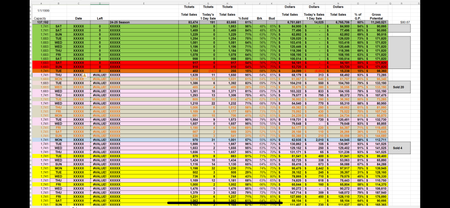
I’ve attached two pictures of a sales report. The black and white is what I’m starting with and the colored version is the goal (currently coloring it manually) I need the row to highlight...

The_lich_adventurer
Jun 13, 2025Copper Contributor
Thank you!!! This works wonderfully! For clarification, it’s really two colors- the other colors represent the same thing just depending on <30 days out or >30 days out, or 6 months, etc. (column D) Is there a way to incorporate that into the formula? The extra colors you see, blue and dark orange, are usually one offs for cancelations or rescheduling etc. so I’m not worried about those.

HansVogelaar
Jun 13, 2025MVP
You can use formulas such as
=AND($I9<$J9, $D9<=30)
=AND($I9<$J9, $D9>30, $D9<=60)
etc.