Forum Discussion

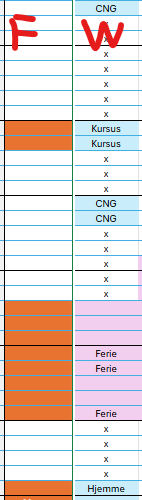
Conditional formatting for a whole column, based on same-row-cells, but in one single rule
- Apr 16, 2026
Hi you are so close. So
a) set the "applied to" range to be all of the cells you need it to apply to (e.g. F119:F229)
b) change the formula to NOT have the $ in front of the row numbers (and make sure the row number corresponds to the upper left of the "applied to" range)
so in your example if the applied to range is F119:G229 (i.e. row 119 is the FIRST / upper left corner of the "applied to range")
Then the formula would be:
=OG($W119<>"x";$W119<>"CNG")The $ in front of the W can stay or go since you are only applying it to a single column. Basically that $ mean do NOT change it relative to the applied to cell but withOUT the $ it WILL change relative to the applied to cell.

Hi you are so close. So
a) set the "applied to" range to be all of the cells you need it to apply to (e.g. F119:F229)
b) change the formula to NOT have the $ in front of the row numbers (and make sure the row number corresponds to the upper left of the "applied to" range)
so in your example if the applied to range is F119:G229 (i.e. row 119 is the FIRST / upper left corner of the "applied to range")
Then the formula would be:
=OG($W119<>"x";$W119<>"CNG")
The $ in front of the W can stay or go since you are only applying it to a single column. Basically that $ mean do NOT change it relative to the applied to cell but withOUT the $ it WILL change relative to the applied to cell.