Forum Discussion

conditional formatting excel
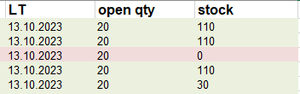
- Oct 12, 2023
Select the range that you want to color this way.
Set the fill color to light green - this will be the default.
The active cell within the selection should be in the top row.
In the following, I'll assume that the open qty data are in B2 and down, and the stock data in C2 and down.
On the Home tab of the ribbon, click Conditional Formatting > New Rule...
Select 'Use a formula to determine which cells to format'.
Enter the formula=$B2>$C2
Click Format...
Activate the Fill tab.
Select light red as highlight color.
Click OK, then click OK again.

Select the range that you want to color this way.
Set the fill color to light green - this will be the default.
The active cell within the selection should be in the top row.
In the following, I'll assume that the open qty data are in B2 and down, and the stock data in C2 and down.
On the Home tab of the ribbon, click Conditional Formatting > New Rule...
Select 'Use a formula to determine which cells to format'.
Enter the formula
=$B2>$C2
Click Format...
Activate the Fill tab.
Select light red as highlight color.
Click OK, then click OK again.
 CuorepazzuOct 13, 2023Copper ContributorThank you!