Forum Discussion

Conditional formatting columns based on sums of rows
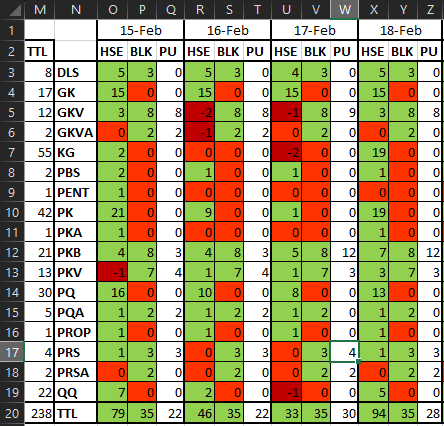
- Feb 01, 2024
Select Z3:Z20.
Hold down Ctrl and select W3:W20, adding it to the selection.
Still holding down Ctrl, also select T3:T20 and finally Q3:Q20.
Q3 should be the active cell in the selection
On the home tab of the ribbon, click Conditional Formatting > New Rule...
Select 'Format only cells that contain'.
Leave the first drop down set to 'Cell Value'.
Select 'greater than' from the second drop down.
In the box next to it, enter the formula=SUM(O3:P3)
Click Format...
Activate the Fill tab.
Select a highlight color.
Click OK, then click OK again.

Select Z3:Z20.
Hold down Ctrl and select W3:W20, adding it to the selection.
Still holding down Ctrl, also select T3:T20 and finally Q3:Q20.
Q3 should be the active cell in the selection
On the home tab of the ribbon, click Conditional Formatting > New Rule...
Select 'Format only cells that contain'.
Leave the first drop down set to 'Cell Value'.
Select 'greater than' from the second drop down.
In the box next to it, enter the formula
=SUM(O3:P3)
Click Format...
Activate the Fill tab.
Select a highlight color.
Click OK, then click OK again.
 ProperTrevorFeb 01, 2024Copper ContributorThank you!
That was simpler than I was expecting. I was getting caught up on the auto $locked cell reference in formatting. I also didn't know that the "active cell" selection would make a difference. Much appreciated!