Forum Discussion

Conditional Formatting Based on Frequency
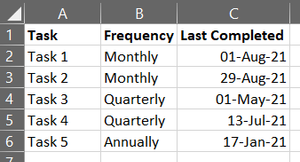
- Aug 31, 2021
Select A2:C6 (or however far down the data go).
The active cell in the selection should be in row 2.
On the home tab of the ribbon, select Conditional Formatting > New Rule...
Select 'Use a formula to determine which cells to format'.
Enter the formula =AND($B2<>"",$C2<>"")
Click Format...
Activate the Fill tab.
Select red.
Click OK, then click OK again.
Repeat the above steps, but with the formula
=$C2>=TODAY()-IF($B2="Monthly",40,IF($B2="Quarterly",100,365))
and orange.
Finally, repeat them again with the formula
=$C2>=TODAY()-IF($B2="Monthly",30,IF($B2="Quarterly",90,365))
and green.

Select A2:C6 (or however far down the data go).
The active cell in the selection should be in row 2.
On the home tab of the ribbon, select Conditional Formatting > New Rule...
Select 'Use a formula to determine which cells to format'.
Enter the formula =AND($B2<>"",$C2<>"")
Click Format...
Activate the Fill tab.
Select red.
Click OK, then click OK again.
Repeat the above steps, but with the formula
=$C2>=TODAY()-IF($B2="Monthly",40,IF($B2="Quarterly",100,365))
and orange.
Finally, repeat them again with the formula
=$C2>=TODAY()-IF($B2="Monthly",30,IF($B2="Quarterly",90,365))
and green.
 LL1991Sep 01, 2021Copper ContributorThank you so much! Not as complicated as I thought...