Forum Discussion

dlopez20
Sep 08, 2023Copper Contributor
Cond. Format Empty Cell Based based on Expired Due Date
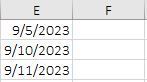
Hello, I am looking to conditional format the cells in the F column yellow if 2 days have passed since the date cells in the E column and nothing has been entered into the F column. How would I go a...
- Sep 08, 2023
Select F2:F100, or as far down as you want.
F2 should be the active cell in the selection.
On the Home tab of the ribbon, click Conditional Formatting > New Rule...
Select 'Use a formula to determine which cells to format'.
Enter the formula=AND(E2<>"", E2<=TODAY()-2, F2="")
Click Format...
Activate the Fill tab.
Select yellow as highlight color.
Click OK, then click OK again.

HansVogelaar
Sep 08, 2023MVP
Select F2:F100, or as far down as you want.
F2 should be the active cell in the selection.
On the Home tab of the ribbon, click Conditional Formatting > New Rule...
Select 'Use a formula to determine which cells to format'.
Enter the formula
=AND(E2<>"", E2<=TODAY()-2, F2="")
Click Format...
Activate the Fill tab.
Select yellow as highlight color.
Click OK, then click OK again.

dlopez20
Sep 15, 2023Copper Contributor
Thank you, this is exactly what I'm looking for.