Forum Discussion

dlopez20
Sep 08, 2023Copper Contributor
Cond. Format Empty Cell Based based on Expired Due Date
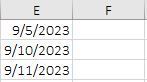
Hello, I am looking to conditional format the cells in the F column yellow if 2 days have passed since the date cells in the E column and nothing has been entered into the F column. How would I go a...
- Sep 08, 2023
Select F2:F100, or as far down as you want.
F2 should be the active cell in the selection.
On the Home tab of the ribbon, click Conditional Formatting > New Rule...
Select 'Use a formula to determine which cells to format'.
Enter the formula=AND(E2<>"", E2<=TODAY()-2, F2="")
Click Format...
Activate the Fill tab.
Select yellow as highlight color.
Click OK, then click OK again.

HansVogelaar
Sep 08, 2023MVP
Select F2:F100, or as far down as you want.
F2 should be the active cell in the selection.
On the Home tab of the ribbon, click Conditional Formatting > New Rule...
Select 'Use a formula to determine which cells to format'.
Enter the formula
=AND(E2<>"", E2<=TODAY()-2, F2="")
Click Format...
Activate the Fill tab.
Select yellow as highlight color.
Click OK, then click OK again.
 dlopez20Sep 15, 2023Copper ContributorThank you, this is exactly what I'm looking for.