Forum Discussion

Comparing 2 sheets to identify records that exist in one, but not the other
- Jan 28, 2025
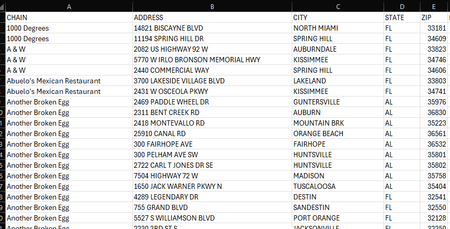
Hans' solution will highlight the lines in the 2023 sheet that are not present in 2024.
My only note would be that although it may not be the case, it is possible for 2 different businesses to have the same street address (e.g. different town or if 2 different businesses are in same 'super structure' like a mall or something). That said you can use:
=ISERROR( XMATCH( $A2 & $B2, '2024 Sheet'!$A:$A & '2024 Sheet'!$B:$B ) )If you want a list instead of highlighting you can use:
=UNIQUE(VSTACK(
          2023!$A1:$A1000 & 2023!$B1:$B1000,
          2024!$A1:$A1000 & 2024!$B1:$B1000,
          2024!$A1:$A1000 & 2024!$B1:$B1000)
   , , TRUE)
so basically stack 2023 with 2 cases of 2024 so only cases with 2023 and not 2024 will show only 1x

Hans' solution will highlight the lines in the 2023 sheet that are not present in 2024.
My only note would be that although it may not be the case, it is possible for 2 different businesses to have the same street address (e.g. different town or if 2 different businesses are in same 'super structure' like a mall or something). That said you can use:
=ISERROR( XMATCH( $A2 & $B2, '2024 Sheet'!$A:$A & '2024 Sheet'!$B:$B ) )If you want a list instead of highlighting you can use:
=UNIQUE(VSTACK(
          2023!$A1:$A1000 & 2023!$B1:$B1000,
          2024!$A1:$A1000 & 2024!$B1:$B1000,
          2024!$A1:$A1000 & 2024!$B1:$B1000)
   , , TRUE)
so basically stack 2023 with 2 cases of 2024 so only cases with 2023 and not 2024 will show only 1x
 robertcox87Jan 29, 2025Copper Contributor
You are correct, many addresses are used multiple times for different businesses. This formula gave me exactly what I needed. Thanks so much!