Forum Discussion

Comparing 2 sheets to identify records that exist in one, but not the other
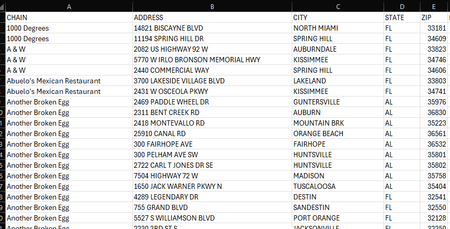
- Jan 28, 2025
Hans' solution will highlight the lines in the 2023 sheet that are not present in 2024.
My only note would be that although it may not be the case, it is possible for 2 different businesses to have the same street address (e.g. different town or if 2 different businesses are in same 'super structure' like a mall or something). That said you can use:
=ISERROR( XMATCH( $A2 & $B2, '2024 Sheet'!$A:$A & '2024 Sheet'!$B:$B ) )If you want a list instead of highlighting you can use:
=UNIQUE(VSTACK(
          2023!$A1:$A1000 & 2023!$B1:$B1000,
          2024!$A1:$A1000 & 2024!$B1:$B1000,
          2024!$A1:$A1000 & 2024!$B1:$B1000)
   , , TRUE)
so basically stack 2023 with 2 cases of 2024 so only cases with 2023 and not 2024 will show only 1x


Select B2:B1000 (or however far down the data extend) on the 2023 sheet. B2 should be the active cell in the selection.
On the Home tab of the ribbon, click Conditional Formatting > New Rule...
Select 'Use a formula to determine which cells to format'.
Enter the formula
=ISERROR(XMATCH(B2, '2024 Sheet'!B:B))
where 2024 Sheet is the name of the sheet for 2024.
Click Format...
Activate the Fill tab.
Select a fill color.
Click OK, then click OK again.
 robertcox87Jan 29, 2025Copper Contributor
Thank you!