Forum Discussion

Compare diffrently structured time periods for errors
- Apr 17, 2021
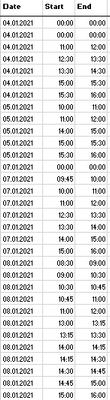
Not sure I understood correctly what is required. If the goal is to convert range as in File1 to one which is in File2
(from most left here to most right one), variant could be using formulas:
in F2
=IFERROR(INDEX(B:B,
   AGGREGATE(15,6,1/
    ($B$2:INDEX($B:$B,COUNTA($B:$B))<>$C$1:INDEX($C:$C,COUNTA($B:$B)-1)) /
    ($B$2:INDEX($B:$B,COUNTA($B:$B)) <> 0)  *
    ROW($B$2:INDEX($B:$B,COUNTA($B:$B))),
    ROW()-ROW($F$1)
  )),
"")
copy and paste this cell to E2.
In G2
=IFERROR(INDEX(C:C,
   AGGREGATE(15,6,1/
    ($C$2:INDEX($C:$C,COUNTA($B:$B))<>$B$3:INDEX($B:$B,COUNTA($B:$B)+1)) /
    ($B$2:INDEX($B:$B,COUNTA($B:$B)) <> 0)   *
    ROW($B$2:INDEX($B:$B,COUNTA($B:$B))),
    ROW()-ROW($F$1)
  )),
"")
Select E2:G2 and drag down till empty cells appear.


Your right Mr. Baklan really is the best! 🙂

There are many very good Excel experts here (do not mean me 🙂 like Mr. Sergei Baklan.
But such good insider knowledge, and knowledge of almost all Office versions, makes some people irreplaceable :).
As in the saying, "All are replaceable, only some people take a very, very long time" :).
The very good knowledge of English is always an advantage.
Since you got your help right away, I recommend that you rate Mr. Sergei Baklan's answer as the correct answer, so that other members can also benefit from it.
Thank you for your understanding and patience
Nikolino
I know I don't know anything (Socrates)
- SergeiBaklanApr 20, 2021Diamond Contributor
Change99 , you are welcome
- Change99Apr 20, 2021Brass ContributorYes thats exactly what was needed! Thank you 🙂
- SergeiBaklanApr 17, 2021Diamond Contributor
Not sure I understood correctly what is required. If the goal is to convert range as in File1 to one which is in File2
(from most left here to most right one), variant could be using formulas:
in F2
=IFERROR(INDEX(B:B,
   AGGREGATE(15,6,1/
    ($B$2:INDEX($B:$B,COUNTA($B:$B))<>$C$1:INDEX($C:$C,COUNTA($B:$B)-1)) /
    ($B$2:INDEX($B:$B,COUNTA($B:$B)) <> 0)  *
    ROW($B$2:INDEX($B:$B,COUNTA($B:$B))),
    ROW()-ROW($F$1)
  )),
"")
copy and paste this cell to E2.
In G2
=IFERROR(INDEX(C:C,
   AGGREGATE(15,6,1/
    ($C$2:INDEX($C:$C,COUNTA($B:$B))<>$B$3:INDEX($B:$B,COUNTA($B:$B)+1)) /
    ($B$2:INDEX($B:$B,COUNTA($B:$B)) <> 0)   *
    ROW($B$2:INDEX($B:$B,COUNTA($B:$B))),
    ROW()-ROW($F$1)
  )),
"")
Select E2:G2 and drag down till empty cells appear.
- Change99Apr 16, 2021Brass ContributorHansVogelaar is a master too! He helped me a lot!
But I did mark Baklans response.