Forum Discussion

karth1109
Dec 16, 2021Copper Contributor
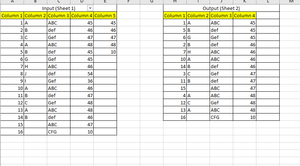
Compare 2 columns and extract data to another sheet
I am looking for a formula or a short code for comparing column 5 (Unique) values with column 4 in Sheet 1 of Workbook and if they are equal that row should be copied to Sheet 2 which will be my o...

karth1109
Dec 16, 2021Copper Contributor
OliverScheurich thanks for the these formulas , the above formulas are using continues numbers in the set given . In case if each cell has a random 5 or 8 digit number which will be my unique value (about 100 of them ) the above formulas will not work so ideally for my case each cell of column 5 should be checked for matching value/values in column 4 - extract that row and publish the data in other sheet
so should it be done in VB or some kind of formula still works for it ?
so should it be done in VB or some kind of formula still works for it ?

OliverScheurich
Dec 16, 2021Gold Contributor
If one can solve this with VBA or Power Query that would probably be the best way.
I can't do this with either way but i can suggest a makeshift solution.
In attached file in sheet "Tabelle2" i entered values in Column Z (this can easily be done with autofill) and used a formula to concatenate these values in Column AA. I copied the entry of cell AA200 and pasted only values in cell G4 and wraped it in an OR formula in cell G4. Now range G3:G4 is the criteria range for advanced filter. I verified the filter result with a nested sum formula in cells O4 and P4.