Forum Discussion

MenneW
Feb 12, 2024Copper Contributor
Combining two lists
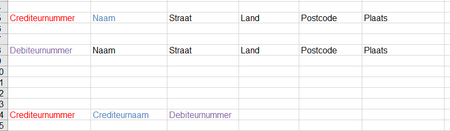
Dear Forum Users, I have a question regarding fusing two lists of information in to one, i color coded them so it is clear where the information is pulled from. How do i go about this? ...

Feb 22, 2024
Using the -1 and 1 options for the match mode is not great with a list of names, because you might get an unexpected result. Is it an option to fix the data in one of the lists where it's not an exact match?
Another option may be to match on the other fields. I notice that both the source lists have the straat, land, postcode and plaats. Assuming those are unique for each entry, it should work.
Another option may be to match on the other fields. I notice that both the source lists have the straat, land, postcode and plaats. Assuming those are unique for each entry, it should work.

MenneW
Feb 22, 2024Copper Contributor
Fixing data may not be an option, we're talking about 40000 lines. I will try matching on adresses.
- Feb 22, 2024You may want to consider using Power Query to merge these lists. It will avoid the need for thousands of formulas, and you can easily find out which rows don't have a match.
It's straightforward to do this. For each of your lists, you need to go to the Data tab of the ribbon, then choose "From Table/Range" to create a query for each.
Once you've created a query for each list, you can merge them as described in this article.
https://support.microsoft.com/en-us/office/create-a-fuzzy-match-power-query-ffdd5082-c0c8-4c8e-a794-bd3962b90649