Forum Discussion

Combine multiple results in to 1 row


Hi,
I found that the pivot table was throwing out some incorrect results so I started again.
I've used the phrase table a couple of times but I mean the cells with the relevant info. I haven't actually formated or created any tables.
I started by sorting my imported data from an import sheet onto a separate worksheet into date order with the newest results at the top so that an Xlookup would always return the newest result.
=SORT(FILTER(A2:D7001,A2:A7001<>""),4,-1)
I then referenced the sorted data above as below and used helper rows to add a searchable index code.
in cell L2 =IF(F2="","",F2) F2 being the account number on the sorted table above
cell O2 =IF($H2=O$1,$I2,"")
H2 being the 1st result from the sorted table above that is matches the topic in O1 in the table below.
Index code in cell N2 =IF(O2="","",$L2&O$1)
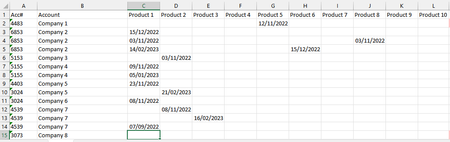
I was then able to consolidate everything into 1 unique table showing only the newest contacts per customer per topic as below.
Cell AI =SORT(UNIQUE(FILTER(L2:L7001,L2:L7001<>"")))
Cell AK2 =XLOOKUP($AI2&AK$1,N:N,O:O,"")
Cell AK3 =XLOOKUP($AI2&AL$1,P:P,Q:Q,"")
And so on and then the date of the latest contact in Cell AU2
=IF(SUM(AK2:AT2)<=1,"",MAX(AK2:AT2))
I then created 2 lists AX1 to AX9 and AZ1 to AZ3 to use as sort options on a results worksheet.
AY1 to AY9 is the column to sort by and BA1 to BA3 is the sort order.
BC1 references a dropdown on the results worksheet then looks up the number to use in the sort function
=XLOOKUP(Results!O2,Worksheet!AX1:AX12,Worksheet!AY1:AY12)
BC2 does the same to find the other number to use in the same sort function
=XLOOKUP(Results!R2,Worksheet!AZ1:AZ3,Worksheet!BA1:BA3)
This then gives me the table below that can be sorted by topic / account / last contact etc and sort order by selecting the options in the dropdown in O2 and R2.
I've hidden the account names for data confidentiality reasons. I hope I've explained this well.

- AndyT410Apr 25, 2023Brass ContributorAttached 🙂
- LorenzoApr 25, 2023Silver Contributor
- AndyT410Apr 26, 2023Brass ContributorThe data in Import is a list of rep visits by date and the products they discussed. In that form it's unusable as I needed to show all interactions per customer by product.
The data in the Results sheet is the most recent contact per customer on every product that has been discussed. This can then be filtered by product, account, and last contact both oldest to newest and newest to oldest.