Forum Discussion

GEEK_21
Oct 14, 2023Brass Contributor
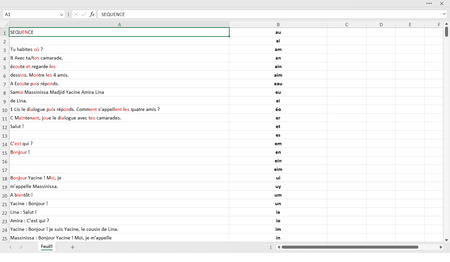
Color the sequence of letters from column B to column A !
I want excel to look for and color the sequence of letters listed in column B on column A. I tried a lot of functions but nothing worked
- Oct 14, 2023Sub ColorLetters()
Dim rng1 As Range
Dim rng2 As Range
Dim cel1 As Range
Dim cel2 As Range
Dim val1 As String
Dim val2 As String
Dim n As Long
Dim pos As Long
Application.ScreenUpdating = False
Set rng1 = Range(Range("A1"), Range("A" & Rows.Count).End(xlUp))
rng1.Font.ColorIndex = xlColorIndexAutomatic
Set rng2 = Range(Range("B1"), Range("B" & Rows.Count).End(xlUp))
For Each cel1 In rng1
If TypeName(cel1.Value) = "String" Then
val1 = cel1.Value
End If
If val1 <> "" Then
For Each cel2 In rng2
If TypeName(cel2.Value) = "String" Then
val2 = cel2.Value
End If
If val2 <> "" Then
n = Len(val2)
pos = 0
Do
pos = InStr(pos + 1, val1, val2, vbTextCompare)
If pos = 0 Then Exit Do
cel1.Characters(Start:=pos, Length:=n).Font.Color = vbRed
Loop
End If
Next cel2
End If
Next cel1
Application.ScreenUpdating = True
End Sub

HansVogelaar
Oct 14, 2023MVP
Run this macro:
Sub ColorLetters()
    Dim rng1 As Range
    Dim rng2 As Range
    Dim cel1 As Range
    Dim cel2 As Range
    Dim val1 As String
    Dim val2 As String
    Dim n As Long
    Dim pos As Long
    Application.ScreenUpdating = False
    Set rng1 = Range(Range("A1"), Range("A" & Rows.Count).End(xlUp))
    rng1.Font.ColorIndex = xlColorIndexAutomatic
    Set rng2 = Range(Range("B1"), Range("B" & Rows.Count).End(xlUp))
    For Each cel1 In rng1
        val1 = cel1.Value
        If val1 <> "" Then
            For Each cel2 In rng2
                val2 = cel2.Value
                If val2 <> "" Then
                    n = Len(val2)
                    pos = 0
                    Do
                        pos = InStr(pos + 1, val1, val2, vbTextCompare)
                        If pos = 0 Then Exit Do
                        cel1.Characters(Start:=pos, Length:=n).Font.Color = vbRed
                    Loop
                End If
            Next cel2
        End If
    Next cel1
    Application.ScreenUpdating = True
End Sub
GEEK_21
Oct 14, 2023Brass Contributor
Sub ColorLetters()
Dim rng1 As Range
Dim rng2 As Range
Dim cel1 As Range
Dim cel2 As Range
Dim val1 As String
Dim val2 As String
Dim n As Long
Dim pos As Long
Application.ScreenUpdating = False
Set rng1 = Range(Range("A1"), Range("A" & Rows.Count).End(xlUp))
rng1.Font.ColorIndex = xlColorIndexAutomatic
Set rng2 = Range(Range("B1"), Range("B" & Rows.Count).End(xlUp))
For Each cel1 In rng1
If TypeName(cel1.Value) = "String" Then
val1 = cel1.Value
End If
If val1 <> "" Then
For Each cel2 In rng2
If TypeName(cel2.Value) = "String" Then
val2 = cel2.Value
End If
If val2 <> "" Then
n = Len(val2)
pos = 0
Do
pos = InStr(pos + 1, val1, val2, vbTextCompare)
If pos = 0 Then Exit Do
cel1.Characters(Start:=pos, Length:=n).Font.Color = vbRed
Loop
End If
Next cel2
End If
Next cel1
Application.ScreenUpdating = True
End Sub
Dim rng1 As Range
Dim rng2 As Range
Dim cel1 As Range
Dim cel2 As Range
Dim val1 As String
Dim val2 As String
Dim n As Long
Dim pos As Long
Application.ScreenUpdating = False
Set rng1 = Range(Range("A1"), Range("A" & Rows.Count).End(xlUp))
rng1.Font.ColorIndex = xlColorIndexAutomatic
Set rng2 = Range(Range("B1"), Range("B" & Rows.Count).End(xlUp))
For Each cel1 In rng1
If TypeName(cel1.Value) = "String" Then
val1 = cel1.Value
End If
If val1 <> "" Then
For Each cel2 In rng2
If TypeName(cel2.Value) = "String" Then
val2 = cel2.Value
End If
If val2 <> "" Then
n = Len(val2)
pos = 0
Do
pos = InStr(pos + 1, val1, val2, vbTextCompare)
If pos = 0 Then Exit Do
cel1.Characters(Start:=pos, Length:=n).Font.Color = vbRed
Loop
End If
Next cel2
End If
Next cel1
Application.ScreenUpdating = True
End Sub