Forum Discussion

GEEK_21
Oct 14, 2023Brass Contributor
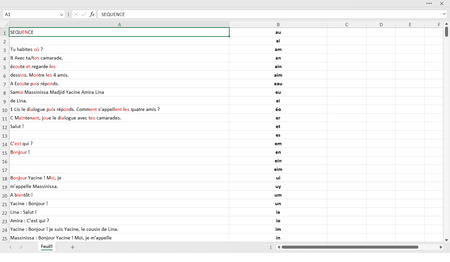
Color the sequence of letters from column B to column A !
I want excel to look for and color the sequence of letters listed in column B on column A. I tried a lot of functions but nothing worked
- Oct 14, 2023Sub ColorLetters()
Dim rng1 As Range
Dim rng2 As Range
Dim cel1 As Range
Dim cel2 As Range
Dim val1 As String
Dim val2 As String
Dim n As Long
Dim pos As Long
Application.ScreenUpdating = False
Set rng1 = Range(Range("A1"), Range("A" & Rows.Count).End(xlUp))
rng1.Font.ColorIndex = xlColorIndexAutomatic
Set rng2 = Range(Range("B1"), Range("B" & Rows.Count).End(xlUp))
For Each cel1 In rng1
If TypeName(cel1.Value) = "String" Then
val1 = cel1.Value
End If
If val1 <> "" Then
For Each cel2 In rng2
If TypeName(cel2.Value) = "String" Then
val2 = cel2.Value
End If
If val2 <> "" Then
n = Len(val2)
pos = 0
Do
pos = InStr(pos + 1, val1, val2, vbTextCompare)
If pos = 0 Then Exit Do
cel1.Characters(Start:=pos, Length:=n).Font.Color = vbRed
Loop
End If
Next cel2
End If
Next cel1
Application.ScreenUpdating = True
End Sub


HansVogelaar
Oct 14, 2023MVP
Run this macro:
Sub ColorLetters()
    Dim rng1 As Range
    Dim rng2 As Range
    Dim cel1 As Range
    Dim cel2 As Range
    Dim val1 As String
    Dim val2 As String
    Dim n As Long
    Dim pos As Long
    Application.ScreenUpdating = False
    Set rng1 = Range(Range("A1"), Range("A" & Rows.Count).End(xlUp))
    rng1.Font.ColorIndex = xlColorIndexAutomatic
    Set rng2 = Range(Range("B1"), Range("B" & Rows.Count).End(xlUp))
    For Each cel1 In rng1
        val1 = cel1.Value
        If val1 <> "" Then
            For Each cel2 In rng2
                val2 = cel2.Value
                If val2 <> "" Then
                    n = Len(val2)
                    pos = 0
                    Do
                        pos = InStr(pos + 1, val1, val2, vbTextCompare)
                        If pos = 0 Then Exit Do
                        cel1.Characters(Start:=pos, Length:=n).Font.Color = vbRed
                    Loop
                End If
            Next cel2
        End If
    Next cel1
    Application.ScreenUpdating = True
End Sub- GEEK_21Oct 14, 2023Brass ContributorSub ColorLetters()
Dim rng1 As Range
Dim rng2 As Range
Dim cel1 As Range
Dim cel2 As Range
Dim val1 As String
Dim val2 As String
Dim n As Long
Dim pos As Long
Application.ScreenUpdating = False
Set rng1 = Range(Range("A1"), Range("A" & Rows.Count).End(xlUp))
rng1.Font.ColorIndex = xlColorIndexAutomatic
Set rng2 = Range(Range("B1"), Range("B" & Rows.Count).End(xlUp))
For Each cel1 In rng1
If TypeName(cel1.Value) = "String" Then
val1 = cel1.Value
End If
If val1 <> "" Then
For Each cel2 In rng2
If TypeName(cel2.Value) = "String" Then
val2 = cel2.Value
End If
If val2 <> "" Then
n = Len(val2)
pos = 0
Do
pos = InStr(pos + 1, val1, val2, vbTextCompare)
If pos = 0 Then Exit Do
cel1.Characters(Start:=pos, Length:=n).Font.Color = vbRed
Loop
End If
Next cel2
End If
Next cel1
Application.ScreenUpdating = True
End Sub