Forum Discussion

Chrome View of EXCEL 360 shows border too large
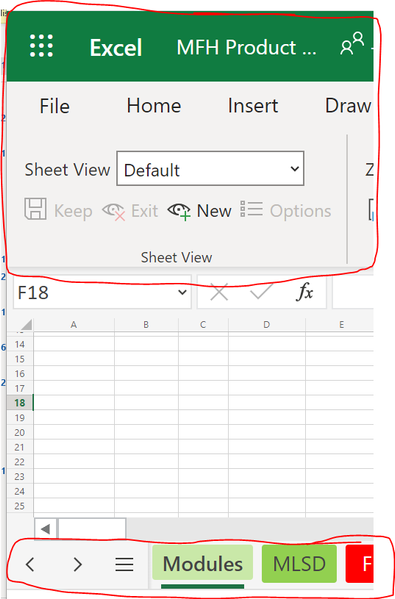
- Jun 17, 2022
G-money99 Yes I figured that wasn't 'enough'. That said, I also notice the CTRL- +/- would only affect the grid area and not the headers BUT I just found out that the ZOOM function in the Chrome menu WILL affect the header too:
Which actually is really nice so you can set your ZOOM down to reduce the headers but use the CTRL + to increase the grid view to be more readable.

G-money99 I was hoping someone else might have more 'advanced' tip but not seeing any other responses I wanted to at least make sure you are aware of being able to switch to a minimized ribbon (although I think you want more):
in the image above is the little carat ^ icon that will switch from large icon ribbon to smaller icon ribbon. But I also wish we could change even more.
 G-money99Jun 17, 2022Copper Contributor
Thank you for your suggestion, but unfortunately, does not resolve the sizing disparity between the workbook gird and the 'fatness' of the border around.
I've tried using Ctrl + scroll, but that zoom functionality in Excel 360 only works in Chrome on the workbook grid, not the borders.
For the time being I have switched to using Microsoft Edge and at least am able to get the functionality I was I had in Chrome. Below is a screenshot from Microsoft Edge which seems to resolve the issue by giving the view a more 'Desktop Excel' experience.
- mtarlerJun 17, 2022Silver Contributor
G-money99 Yes I figured that wasn't 'enough'. That said, I also notice the CTRL- +/- would only affect the grid area and not the headers BUT I just found out that the ZOOM function in the Chrome menu WILL affect the header too:
Which actually is really nice so you can set your ZOOM down to reduce the headers but use the CTRL + to increase the grid view to be more readable.
- G-money99Jun 21, 2022Copper ContributorThank you! Much Appreciated!
G-Money99