Forum Discussion

zazzaboo96
Sep 13, 2024Copper Contributor
Charts with multiple series
I'm on a version of Excel that seems to be nowhere to be found anywhere else on the internet, so I haven't found any meaningful help so far. I need to create a chart with 3 series out of a single set...

Riny_van_Eekelen
Sep 13, 2024Platinum Contributor
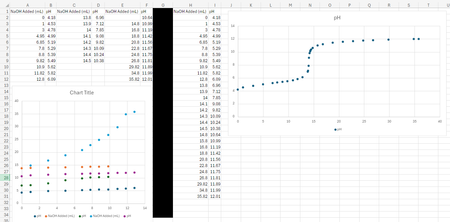
Copy/paste three data sources into one scatter chart will confuse Excel and the axes get switched around with no option to change them back. The result is like in the colourful chart in the bottom left-hand corner of your picture.
You can set up the data in two columns (X,Y), but you need to manually specify each of the series in the "Select data" window. The attached file contains a scatter chart from three series how you want it. I've created this on a Mac but believe you are on a PC, so I'll refrain from adding screen shots. Open the file and see how the data source is broken into 3 series, each with their own trend line.