Forum Discussion

Lorenzo
Jan 22, 2026Silver Contributor
Chart from dynamic array challenge
Hi (Excel 365 v2601 b19628.20132 Current Channel / Windows 11 25H2) Initial post edited (& cross posted here on Jan 29, 2026) after further investigations In B6 below an array that dynamically res...
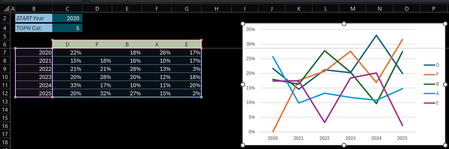

Lorenzo
Feb 01, 2026Silver Contributor
Possible workaround, once the TOPN array has been calc.:
- Unpivot it
- Insert a PivotTable where the data source is the above array
- Insert a PivotChart based on the PivotTable
Notes
- Until the Pivot Table Auto Refresh functionality is generally available a Data > Refresh All is required to update the Chart
- On this simplified scenario - with the above variables - we can see the Categories on the Chart Legend are not ordered the same as on TOPN array. Reason:
- The %ages are calc. with PIVOTBY/PERCENTOF relative to Row Totals - as asked by the user
- Using these %ages as PivotTable data source, the only thing we can do to reflect the appropriate numbers is to Sum the Values
- The sorting of the PivotTable is then relative to Column Totals. And unfortunately, the More Sort Options > Sort By > Values in selected row option requires that the row belongs to be PivotTable
3. To get Pivot & Chart Categories sorted as in the TOPN array the PivotTable data source values must be the Source values, not the %ages - covered in next post...
Call @ Insiders
Could a couple of you already having the Pivot Table Auto Refresh functionality confirm this works w/o a Refresh All please? + Thanks