Forum Discussion

MayAnk__Rathi
May 29, 2025Copper Contributor
Chart for Library Student Occupency Chart
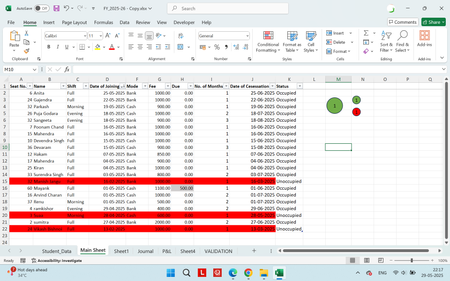
I have study library of 70 seating capacity. All data is only in this sheet. I want to create a chart in which I get libraray seat occupancy status by colour. Whenever seat is occupied then Green co...

Kidd_Ip
May 29, 2025MVP
How about this:
- Prepare Your Data
- Ensure you have columns for seat number, status (occupied or vacant), shift type, and date (column J).
- Convert your data into a structured table for easier updating.
- Use Conditional Formatting for Colors
- Apply Green for occupied seats and Red for vacant seats using conditional formatting based on occupancy status.
- You can do this by setting up rules in Excel’s Conditional Formatting section.
- Create a Scatter Plot for Visual Representation
- Insert a scatter plot, using seat number as labels.
- Adjust the point size dynamically based on shift type:
- Large circles for Full shift.
- Small circles for Morning or Evening shifts.
- Automatically Update Status
- Use an IF formula to check whether the current date has passed column J’s date:
=IF(TODAY()>J2, "Vacant", "Occupied")
- This will ensure that occupancy status updates dynamically.
- Insert Data Labels
- Enable data labels to display the seat number inside the circles.
- MayAnk__RathiMay 30, 2025Copper Contributor
I think you take my words in wrong way.
I just attached a screenshot what I want, and also want to update the chart automatically.
- MayAnk__RathiMay 30, 2025Copper Contributor
I think you take my words in wrong way, I want to update like in screenshot chart update automatically:
