Forum Discussion

Chart displaying "Trendline Error"
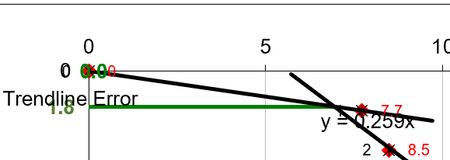

An additional note: The problem occurs when all of the X values of the second Chart Series are zero:
It doesn't happen if the Y values are zero:
And with a chart with only one series. If all the X values are 0 it happens and the trendline doesn't plot but it is OK if all the Y values are zero and then the trendline plots OK:

If all X values are the same, you get a trendline error because the slope is infinite. If all Y values are the same, there is no error, because the trendline is horizontal. This does not explain why the trendline error message appears.
I have not encountered this issue, but I can reproduce it easily enough in Microsoft 365. I'd have to boot up an older laptop to see if it occurred in an earlier version of Excel (2016).
If I was stuck with this problem, I'd calculate my own trendline data in the worksheet, using FORECAST.LINEAR or even SLOPE and INTERCEPT, and plot this data in my charts.
- seisconsJul 24, 2020Copper ContributorThanks Jon, that makes sense about the X and Y difference. I could create trendlines as you say, but I use the technique in several production workbooks that are set up for personnel to use and it would be a lot of work modifying the workbooks and re-deploying the templates. I think I'd prefer Microsoft fix the issue as it really does appear to be something new. I guess I'll have to if they don't.
- SergeiBaklanJul 24, 2020Diamond Contributor
JonPeltierMVP , thank you!
