Forum Discussion

AB747F
Jul 07, 2023Copper Contributor
changing cell value from a drop down list
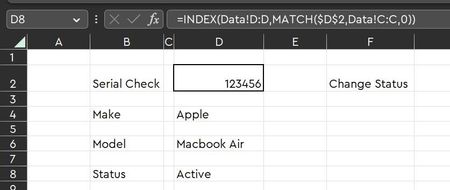
Hi All I'm in need of some help. I have two tabs, one for DATA and one for SEARCH. I would like to be able to use a dropdown menu in SEARCH to update a cell value in DATA. Search Tab ...

SergeiBaklan
Jul 07, 2023Diamond Contributor
I guess that's not the only record in Data tab with the same Status. If you select some Status in Search tab, would you like to show here all records with selected Status, or there are other criteria to select only one?
And on which Excel version/platform you are?
 AB747FJul 07, 2023Copper ContributorThanks Sergei
Essentially i would search for the serial number in the Search Tab. This would then populate the records ie make, model, serial number and status.
If i selected Faulty in the dropdown based on the serial number, i would like that to change the data in the data tab (in this example Data Tab D2 to Faulty).
Is this possible? I'm using version 2304 16327.20324
Thanks
AB- SergeiBaklanJul 07, 2023Diamond Contributor
Afraid that's with VBA programming only. Perhaps someone else could help, not my territory.
- AB747FJul 07, 2023Copper ContributorThanks Sergei
I thought that maybe the case. Is there any way around this? Would the following be possible?
If Cell G2 was manually entered instead of a drop down, would this be able to update D8 in Search and D2 in data? Or am i still looking at VBA?
Tks
AB