Forum Discussion

aholl165
May 28, 2024Tin Contributor
Change the value in one cell when a date changes occurs in another cell
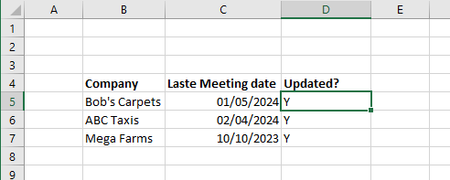
Hi, I've seen a few similar posts but can't quite find what I'm looking for, hopefully someone can help. I'm looking for a macro that will change a value from 'Y' to 'N' when a date change o...
 May 29, 2024
Got what I needed as below, can't take credit as found this elsewhere and tweaked to my own needs,but seems to do the job...
Private Sub Worksheet_Change(ByVal Target As Excel.Range)
Dim rCell As Range
Dim rw As Long
Dim rChange As Range
On Error GoTo ErrHandler
Set rChange = Intersect(Target, Range("B:C"))
If Not rChange Is Nothing Then
Application.EnableEvents = False
For Each rCell In rChange
If rCell > "" Then
With rCell.Offset(0, 4 - ActiveCell.Column)
.Value = "N"
End With
Else
rCell.Offset(0, 4 - ActiveCell.Column).Clear
End If
Next
End If
ExitHandler:
Set rCell = Nothing
Set rChange = Nothing
Application.EnableEvents = True
Exit Sub
ErrHandler:
MsgBox Err.Description
Resume ExitHandler
End Sub
aholl165
May 29, 2024Tin Contributor
Got what I needed as below, can't take credit as found this elsewhere and tweaked to my own needs,but seems to do the job...
Private Sub Worksheet_Change(ByVal Target As Excel.Range)
Dim rCell As Range
Dim rw As Long
Dim rChange As Range
On Error GoTo ErrHandler
Set rChange = Intersect(Target, Range("B:C"))
If Not rChange Is Nothing Then
Application.EnableEvents = False
For Each rCell In rChange
If rCell > "" Then
With rCell.Offset(0, 4 - ActiveCell.Column)
.Value = "N"
End With
Else
rCell.Offset(0, 4 - ActiveCell.Column).Clear
End If
Next
End If
ExitHandler:
Set rCell = Nothing
Set rChange = Nothing
Application.EnableEvents = True
Exit Sub
ErrHandler:
MsgBox Err.Description
Resume ExitHandler
End Sub