Forum Discussion

CHANGE IMAGE WHEN I SELECT ANOTHER NAME ON LIST BOX
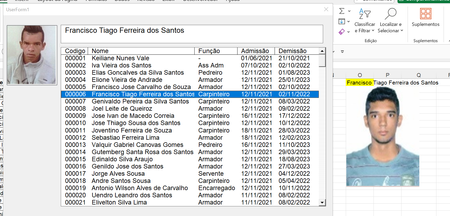

Hello,
Yes it is possible.
To dynamically change the image on a UserForm when a new name is selected from a ListBox in Excel, you need to use an event that triggers every time a selection is made in the ListBox, rather than initializing the image only once in UserForm_Initialize.
The corrected version of the code is as attached. I would be happy if you test and give information and mark it as an answer.
Private Sub UserForm_Initialize()
' Populate the ListBox with names (or IDs) from the worksheet or directly
With ListBox1
.AddItem "Name1"
.AddItem "Name2"
' Add as many items as needed, or load dynamically from a range
End With
End Sub
Private Sub ListBox1_Change()
Dim selectedName As String
Dim imagePath As String
' Get the selected name from the ListBox
selectedName = ListBox1.Value
' Determine the path of the image based on the selected name
' Assuming you have a naming convention for your images
imagePath = ThisWorkbook.Path & "\Images\" & selectedName & ".jpg" ' Adjust the path as needed
' Load the image into the Image control
If Dir(imagePath) <> "" Then
Image1.Picture = LoadPicture(imagePath)
Else
MsgBox "Image not found for " & selectedName, vbExclamation
End If
End Sub
Best Regards,
Ali Koc
 WLLIANNov 10, 2024Brass Contributor
" imagePath = ThisWorkbook.Path & "\Images\" & selectedName & ".jpg" ' Adjust the path as needed"
I dont think this is it.
The images are in the file, in another tab.
This you are telling to bring the images from a folder, right?I want to load the image shape to image object on userform, then when i select another name change the image automatic.
thanks dude.
- AlikocNov 10, 2024MCT
Hello,
Understand...
Since the images are in another worksheet within the same Excel file, you can use VBA to copy the image from the worksheet into the UserForm’s Image control dynamically based on the selected item in the ListBox.
There are some points you should pay attention to.
Ensure Each Image Has a Unique Name: On the worksheet with the images, each image should have a unique name that corresponds to the names in the ListBox.
Modify the UserForm Code: Use the ListBox1_Change event to load the corresponding image into the Image control on the UserForm.
Can you try the command like this?
Private Sub UserForm_Initialize()
    ' Populate the ListBox with names (or IDs) from the worksheet or directly
    With ListBox1
        .AddItem "Name1"
        .AddItem "Name2"
        ' Add as many items as needed, or load dynamically from a range
    End With
End Sub

Private Sub ListBox1_Change()
    Dim selectedName As String
    Dim ws As Worksheet
    Dim imgShape As Shape

    ' Set the worksheet where images are stored
    Set ws = ThisWorkbook.Sheets("ImagesSheet") ' Replace "ImagesSheet" with your actual sheet name

    ' Get the selected name from the ListBox
    selectedName = ListBox1.Value

    ' Try to find the shape with the same name as selected in the ListBox
    On Error Resume Next
    Set imgShape = ws.Shapes(selectedName)
    On Error GoTo 0

    ' If the shape exists, load it into the Image control on the UserForm
    If Not imgShape Is Nothing Then
        ' Export the shape as a temporary image
        Dim tempPath As String
        tempPath = Environ("TEMP") & "\" & selectedName & ".jpg"
        imgShape.Copy
        ws.Paste
        ws.Shapes(ws.Shapes.Count).Export tempPath
        ws.Shapes(ws.Shapes.Count).Delete

        ' Load the exported image into the Image control
        Image1.Picture = LoadPicture(tempPath)

        ' Optionally delete the temporary file if you want
        Kill tempPath
    Else
        MsgBox "Image not found for " & selectedName, vbExclamation
    End If
End Sub
Best Regards,
Ali Koc
- WLLIANNov 10, 2024Brass Contributor
I think you did not understand what i'm trying to do.
If you see the project, when you select a name on the listbox, on the worksheet change the image perfect.
On that action the name select and the image match. Perfect.
The final result that i'm tryng to find is, take that image and load to object image on Userform.
Thanks my friend for the help.
