Forum Discussion

MrSassyBritches
Feb 03, 2020Copper Contributor
Cell value in header
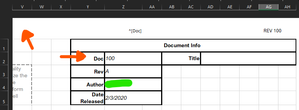
PS: If there is another way to do this, like reference a named section somehow from within the header, that's what the ^[Doc] was meant to be. But everything online points to VBA. I would the page...

MrSassyBritches
Feb 04, 2020Copper Contributor
So the code I found online, in my original post at the top, I could not get to work. The functions Author() and Doc() do work. I just tried what you posted and could not get it to work, do I need something like ^[Workbook_BeforePrint] in the header or something along those lines?

Charla74
Feb 04, 2020Iron Contributor
You need to create the code for the workbook, not in a sheet.
Open VBA editor, double click ‘This Workbook’ in the Microsoft Excel Objects folder (in the ‘Project - VBAProject’ panel to the left). In the code window, you will see two drop down menus; in the first select Workbook and the second Before Print...then type the rest of the code as below.
Open VBA editor, double click ‘This Workbook’ in the Microsoft Excel Objects folder (in the ‘Project - VBAProject’ panel to the left). In the code window, you will see two drop down menus; in the first select Workbook and the second Before Print...then type the rest of the code as below.
- Charla74Feb 04, 2020Iron ContributorMrSassyBritches
Ok, so I just tested this myself and also couldn't get it to work. I found a solution (or rather a workaround) from the Microsoft support pages....So, if you do as per my last post BUT also enter the same code in a regular module, it will work. Although the background code is 'BeforePrint' the header does not actually display until it has been printed.
Let me know if you can get it working.- MrSassyBritchesFeb 04, 2020Copper Contributor
Charla74 Thanks so much for the reply. I think I followed your instructions. Here is a screenshot of "ThisWorkbook" and the exact same code is inside "Module1". Does this look correct per your instructions?
- Charla74Feb 04, 2020Iron Contributor