Forum Discussion

MrSassyBritches
Feb 03, 2020Copper Contributor
Cell value in header
PS: If there is another way to do this, like reference a named section somehow from within the header, that's what the ^[Doc] was meant to be. But everything online points to VBA. I would the page...

MOB69
Feb 03, 2020Copper Contributor
MrSassyBritchesPlease elaborate as to the determining factor for what data appears..?

MrSassyBritches
Feb 03, 2020Copper Contributor
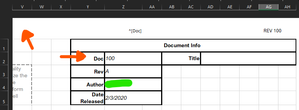
The text. Whatever text is in the cell Z2 I want to be displayed in the top left of the header.
- MOB69Feb 03, 2020Copper Contributor
- MOB69Feb 03, 2020Copper Contributor
How bout making a1 ( or what ever cell you choose ), =z2 and then designate row 1 as a row title for printing.?
- MOB69Feb 03, 2020Copper Contributorwould it be better to discuss via phone..?
- MrSassyBritchesFeb 03, 2020Copper Contributor
I can assure you my communication skills only get worse verbally. I am not looking for a row title, as that is already present in my workbook.
Here is a screenshot to visualize.
Here it is nowand here is what I am looking for (notice the 100 in the top left)
I dont want the user to have to edit the header, they edit that cell next to "Doc" and have the header use that cell.
- MOB69Feb 03, 2020Copper ContributorI probably don't fully understand.
But can you not insert a formula at A1 that references Z2..? - MOB69Feb 03, 2020Copper Contributorwithin the sheet or when printed ,, or both ??
- MrSassyBritchesFeb 03, 2020Copper Contributor
Well the header wont be visible until printed, so when printed I guess.