Forum Discussion

user1234321
Aug 22, 2022Tin Contributor
Cell color changes when registration date nearing expiry?
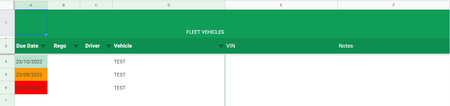
I am creating a spreadsheet for vehicle registration and I would like the cell color to change when it is nearing expiry. Is this possible? Thanks in advance - Cell color RED if date in cell is ...
 Aug 22, 2022Thankyou for this, much appreciated.
Can I duplicate these rules to other cells without manually changing A2 to the new cell, eg A3?

Harun24HR
Aug 22, 2022Silver Contributor
user1234321 You need 3 conditional formatting rule. See attached file.
For red =A2<=TODAY()
For orange =AND(A2-TODAY()>=1,A2-TODAY()<=31)
For green =A2-TODAY()>31
- user1234321Aug 22, 2022Tin ContributorThankyou for this, much appreciated.
Can I duplicate these rules to other cells without manually changing A2 to the new cell, eg A3?- Harun24HRAug 22, 2022Silver ContributorYou do not need to duplicate the rules. It will automatically apply to all cells given to Applies To range.
- user1234321Aug 22, 2022Tin Contributor
I am working with Google sheets - when I add the custom formula to Conditional format rules it applies A2 only