Forum Discussion

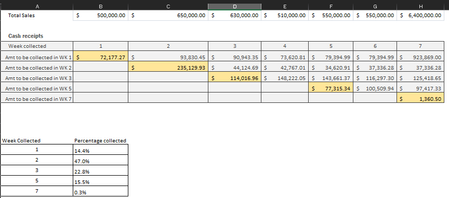
Cash amortization table
- Aug 31, 2024
Inspired by a video posted by PeterBartholomew1 on Youtube some years ago, I thought I could apply the technique covered in it on your cash projection problem. It's in the attached file and you don't need a row for each week. One single formula in B3 gives you the total projected collections for each week.
I wouldn't be surprised if Peter can come-up with an even better solution with some more years of Excel developments behind us.

mathetes Thank you for trying to help me. I have played with formula but unfortunately it is not capturing how much we are expecting to collect each week. I accept that it may be because of my confusing explanation.
Using week # 4 as example, we would be expecting to collect a total of $510,500
-In week #4 we would be attempting to collect 14% of week #4 sales ($510k)
-In week # 4 we would also be attempting to collect 47% of week #3 sales ($630k). This is because week # 4 would be the 2nd week to collect the sales for week #3
-In week # we would also be attempting to collect 22% of week #2 sales ($650k). This is because week # 4 would be the 3rd week to collect the sales for week #2
Note: On my original sample I miscalculated the amounts by doing wrong formula on row #7. Apologies for this. I have corrected it.

Inspired by a video posted by PeterBartholomew1 on Youtube some years ago, I thought I could apply the technique covered in it on your cash projection problem. It's in the attached file and you don't need a row for each week. One single formula in B3 gives you the total projected collections for each week.
I wouldn't be surprised if Peter can come-up with an even better solution with some more years of Excel developments behind us.
- PeterBartholomew1Sep 02, 2024Silver Contributor
Hi Riny, I had just about forgotten recording that one. Perhaps I should try some more.
The formula has stood the test of time reasonably well but, just to show there are other options available,
 = LET(
    array, TAKE(WRAPROWS(TOCOL(EXPAND(wkly_sales * perc,,m+n,0)),m+n-1),m,n),
    BYCOL(array, SUM)
  )
where n and m are the count of sales and percentages respectively. The successive collection rows are shifted to the right by wrapping the rows of 14 values to an array 13 wide.
- mathetesSep 02, 2024Gold Contributor
Hope all is OK with you.
Thankfully, we are all doing well.
Yes, please look at Peter's video. It says it all 🙂
I've looked, and bookmarked the video to watch (along with the several others that Peter has done). One viewing, however, shows me that it's possible, but oh, my, I'd have to go through those steps again, repeating them with my own data (if I can find a situation where I'd use it) before fully understanding it.
So glad that there are people like you and Peter here on this site helping me to keep on learning.
- Riny_van_EekelenAug 31, 2024Platinum Contributor
- mathetesAug 31, 2024Gold Contributor
One single formula in B3 gives you the total projected collections for each week.
One "single formula" made up of functions I've never before seen used! Good job, Riny_van_Eekelen , but can you explain it? Or do I need to view Peter's video?
I'm still at the level of Excel where I like to see intermediate steps, steps I can understand. But I always appreciate seeing these powerful examples of how much there is yet to learn.

