Forum Discussion

Cash amortization table
- Aug 31, 2024
Inspired by a video posted by PeterBartholomew1 on Youtube some years ago, I thought I could apply the technique covered in it on your cash projection problem. It's in the attached file and you don't need a row for each week. One single formula in B3 gives you the total projected collections for each week.
I wouldn't be surprised if Peter can come-up with an even better solution with some more years of Excel developments behind us.


Sorry for not thoroughly explaining. The percentages shouldn't change. These percentages are calculated based on how we expect to collect weekly payments. We have many customers that are on payment terms such as upon invoice, 7 days, 14 days etc. We are currently trying to get an idea on how much to expect to be collected every week based on the 5 percentage groups.
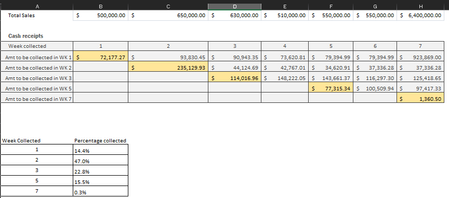
For example, we collect 14.4% of total sales in week #1. In week #2 we collect 14.4% of week #2 sales sales plus 47% of week #1 sales. In week 3 we collect 14.4% of week #3 sales, plus 47% of week #2 sales plus 22.8% of week #1 sales.

You still haven't explained; all you've done, in effect, is to reiterate "these are the numbers," but that part is clear. Yes, those are the numbers.
You do say this: These percentages are calculated based on how we expect to collect weekly payments.
But HOW are they calculated, and out to the 13th decimal place?!! There must be some really precise calculations going on based on individual customers, some of whom pay in 7 and a half days, others 12 days, others who knows what.... You see my point. You say they're calculated numbers but those numbers certainly appear (to me at any rate) to be absurdly precise (AKA "arbitrary") results of un-explained (to this point) calculations.
We are currently trying to get an idea on how much to expect to be collected every week based on the 5 percentage groups.
So why aren't you satisfied just playing out the numbers based on those 5 percentage groups? What is missing that leads to dissatisfaction?
I really want to help, but what you've said so far still seems like you're trying to make sense (come up with formulas) in a system that inherently has no true coherence.
- RPINEDA2Aug 28, 2024Copper Contributor
Thank you for trying to help me. Would it be best if I change the percentages to whole numbers for sample purposes?
B6:H10 contains the data that I would like the chart to show. I am just trying to figure a way to do it without having to manually insert a formula in every row/column to follow the logic of planned cash collection.
- mathetesAug 28, 2024Gold Contributor
=LET(
pcnt,VLOOKUP(B$5,$A$17:$B$21,2,0),
sales,HLOOKUP($A6,$B$1:$H$2,2,0),
IFERROR(pcnt*sales,0)
)
Allow me to explain the LET function. At its core, LET enables you to name temporary variables and use them in a formula. The idea is to make formulas more legible. In this case,
- I create a variable called "pcnt" which uses VLOOKUP to determine the percentage appropriate for the nth week since sales (drawing on the row heading for that week).
- I then create a variable called "sales" which uses HLOOKUP to determine the sales figure for the week in question, drawing on the column heading for that week.
- Then, finally, the formula is a simple pcnt*sales but, because there are weeks when the pcnt is non-existent, I surround pcnt*sales with an IFERROR function so that zero appears instead of an error message. Hence, the formula IFERROR(pcnt*sales,0)
And that formula, the entire LET formula, will continue to work with more weeks worth of sales, though frankly I'd suggest changing it to an ongoing set column of weekly sales and convert the HLOOKUP to a VLOOKUP that covers the growing list.
- mathetesAug 28, 2024Gold Contributor
Would it be best if I change the percentages to whole numbers for sample purposes?
Not really, since it still leaves me curious how such numbers were calculated in the first place. But OK if you don't want to explain. I've come up with a formula. Here it is:
=LET(pcnt,VLOOKUP(B$5,$A$15:$B$19,2,0),sales,HLOOKUP($A6,$B$1:$H$2,2,0),IFERROR(pcnt*sales,0))This uses a relatively recent Excel function, LET, so it will require that you have Excel 2021 or newer.
It seemed to me that to have a single formula, it made sense to rearrange how you display the data, so what this now shows is, row by row, how each week's sales are collected in the first, second, third, fifth and seventh week from initial sale. The collection of the sales of week 1 are all accounted for in the first row; sales of week 2 are accounted for in the second row. And so on. It looks like this:
The advantage of this layout, I think, is that you could continue the first two rows for a long way and just extend the table with the calculations downward. That would require some minimal revision of the HLOOKUP portion of the formula.
Let me know if this works for you.
- RPINEDA2Aug 30, 2024Copper Contributor
mathetes Thank you for trying to help me. I have played with formula but unfortunately it is not capturing how much we are expecting to collect each week. I accept that it may be because of my confusing explanation.
Using week # 4 as example, we would be expecting to collect a total of $510,500
-In week #4 we would be attempting to collect 14% of week #4 sales ($510k)
-In week # 4 we would also be attempting to collect 47% of week #3 sales ($630k). This is because week # 4 would be the 2nd week to collect the sales for week #3
-In week # we would also be attempting to collect 22% of week #2 sales ($650k). This is because week # 4 would be the 3rd week to collect the sales for week #2
Note: On my original sample I miscalculated the amounts by doing wrong formula on row #7. Apologies for this. I have corrected it.