Forum Discussion

Mouzo
Aug 23, 2021Copper Contributor
Can't unhide a sheet
Hello, I have an excel that contains many list fields, with an auxiliary sheet where the values of each list are. It is an auxiliary sheet I have always had it hidden and I have been able to unhide ...
- Aug 25, 2021
I'm glad to hear you found the solution!

Mouzo
Aug 24, 2021Copper Contributor
Thank you HansVogelaar
Yes, the workbook it's protected because it's a shared workbook.
But, when I have to update it, I unprotect the workbook. I had done this, and always it worked fine, but this time, I can't do it :(.
I tried to re-protect and unproted but doesn't work...


HansVogelaar
Aug 24, 2021MVP
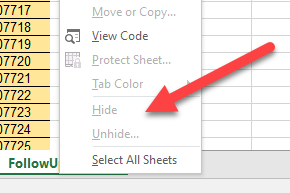
From the look of the context menu in your screenshot, the workbook is still protected...
- MouzoAug 24, 2021Copper ContributorYeah, in the context menu, but in the ribbon not
- HansVogelaarAug 24, 2021MVP
Could you attach a copy of the workbook? You can remove all visible sheets except one, and clear the remaining visible sheet.
- MouzoAug 25, 2021Copper Contributor
HansVogelaar Thank you
I found the problem!
When I "unshared and unprotect the workbook", i tried to "unprotect again only the workbook", and SUPRISE, I could unhide the sheets...
Thank you for you attentions and help!