Forum Discussion

Can't unhide a sheet
- Aug 25, 2021
I'm glad to hear you found the solution!

Perhaps the workbook has been protected for structure.
Activate the Review tab of the ribbon.
Is the Protect Workbook button in the Protect group highlighted? If so, click it to turn it off. You may have to provide a password.

Thank you HansVogelaar
Yes, the workbook it's protected because it's a shared workbook.
But, when I have to update it, I unprotect the workbook. I had done this, and always it worked fine, but this time, I can't do it :(.
I tried to re-protect and unproted but doesn't work...

- HansVogelaarAug 24, 2021MVP
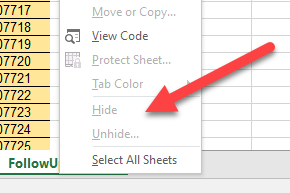
From the look of the context menu in your screenshot, the workbook is still protected...
- MouzoAug 24, 2021Copper ContributorYeah, in the context menu, but in the ribbon not
- HansVogelaarAug 24, 2021MVP
Could you attach a copy of the workbook? You can remove all visible sheets except one, and clear the remaining visible sheet.